
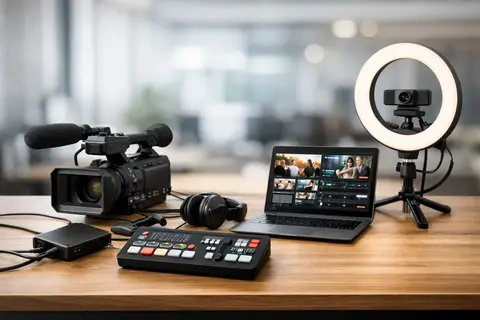
If the sound drops out during a live stream, the picture is grainy, and the lighting falls only on one side of the face, the viewer notices within seconds. That is why a live streaming equipment kit example is not just a list of gear, but a practical solution for a specific work scenario - an individual performance, a company webinar, a product presentation, or multi-channel content production.
There is no single universal kit for live streaming that suits everyone. Rooms, platforms, team size, framing, and the amount of time available for setup all differ. For one person, a single camera, a good USB microphone, and simple lighting are enough; another needs a mixer, wireless audio, multiple cameras, and reliable signal control to a computer. The right choice starts not with the brand, but with the task.
In brief
- Choose a kit based on the work format — a single speaker, a company team, or an event determines the requirements.
- Prioritize sound and lighting — they deliver a bigger quality leap than a more expensive camera.
- For simple scenarios, one camera and a USB microphone are enough; multi-channel broadcasts require a mixer and a capture card.
- Rental is useful for infrequent professional needs; for regular work, a basic owned kit is better.
- Check power, cables, spare batteries, and memory cards before every broadcast.
What to choose for different tasks
| Task | Solution | Why |
|---|---|---|
| Simple webinar or home studio for one speaker | One USB or HDMI camera, a desktop USB microphone or lavalier microphone, one LED light with a diffuser, a tripod, and a video capture card (if you need to connect to a computer). | This solution is quick to set up, provides stable audio and acceptable image quality without an operator, and is suitable for regular content production. |
| Company live stream with 2–3 speakers | Two cameras (e.g., mirrorless or camcorder), a video mixer, wireless lavalier systems or several desktop microphones, additional LED lighting, and a separate monitor for the operator. | More cameras and a mixer make it possible to change framing and maintain stable audio channel distribution, which creates a more professional impression for the audience. |
| Events and multi-channel live streams | Professional camcorders or high-end mirrorless cameras with stable power, a video mixer, an audio console, wireless audio systems, intercom for the team, and backup recordings. | For events, reliability, long operating time, and monitoring are important, as well as the ability to quickly solve problems as a team. |
| Rare professional needs or specialized projects | Equipment rental — video mixers, teleprompters, powerful lights, and wireless audio systems for a specific project. | Rental reduces capital expenses for devices you will use rarely and provides access to specialized equipment without long-term maintenance costs. |
What a live streaming equipment kit example usually includes
A complete kit almost always has five core groups - image, sound, light, stable mounting, and signal transmission. If any one of these parts is weak, the whole live stream feels unfinished. This is especially noticeable in corporate presentations and interviews, where the viewer is less forgiving than on social media.
On the image side, the base can be a camera, mirrorless camera, camcorder, or in some cases even a smartphone. For sound, the most important thing is the microphone, not the camera body. Lighting provides a stable, predictable image, and a tripod or other mount prevents unnecessary movement. Meanwhile, signal transmission requires a capture card, video mixer, or a camera with a suitable USB streaming function.
A simple live streaming equipment kit example for one speaker
If the goal is a webinar, an educational live stream, or regular content from an office or home studio, the most practical kit is compact and quick to set up. Here, the priority is not maximum technical complexity, but a predictable result every time.
For such a scenario, a good solution is one camera with a clean HDMI output or a high-quality USB camera, a tripod, one LED light with a softbox or diffuser, and one microphone. If the speaker sits at a desk, a desk USB microphone or a directional microphone on a stand is often enough. If the person moves around or demonstrates products, a wireless lavalier microphone is more convenient.
The signal can be fed into the computer through a capture device, and that is often enough for Zoom, Teams, YouTube, or Facebook live streams. This configuration is also accessible to users without a dedicated operator. The kit is logical, easy to maintain, and does not require long technical preparation before each broadcast.
However, a compromise should be kept in mind. A single-camera solution is simple, but less dynamic. If the content is based on a conversation, lecture, or demonstration from one angle, it is completely sufficient. If a more impressive visual rhythm is needed, one camera quickly becomes too little.
What provides the biggest gain in this kit
In practice, the biggest jump in quality usually comes not from switching from a mid-range camera to an expensive model, but from a good microphone and proper lighting. The viewer can tolerate a somewhat simpler image, but poor sound is tiring immediately. That is why, in budget allocation, audio and lighting matter more than many people initially assume.
A medium-complexity kit for a company or content team
If live streaming takes place regularly and two or three people are involved, different requirements emerge. One camera and one microphone are no longer enough, because you need to think about changing framing, separating audio sources, and having a backup in case one component fails.
In such a situation, a live streaming equipment kit example may already include two cameras, a video mixer, two wireless microphones or desk microphones, several light sources, and a separate monitor for the operator. A two-camera system makes it possible to switch between a wide shot and a close-up, which instantly makes the broadcast feel more professional. If products or documents are being shown, a third camera for detailed shots is also useful.
On the audio side, companies often choose wireless lavalier microphones because they allow people to speak freely and maintain a more consistent sound level. In rooms with problematic acoustics, however, dynamic microphones on stands may work better, especially in podcast and interview style setups. This is a typical case where there is no single correct solution - everything depends on the room, participants' movement, and framing.
In this kind of kit, a video mixer is no longer an unnecessary extra. It allows you to switch cameras, connect a presentation source, add a logo or titles, and maintain a smooth workflow. If the live stream is intended for clients, partners, or a wider audience, this control often pays off already in the first projects.
A professional kit for events and multi-channel live streaming
In event environments, requirements rise very quickly. Here, not only image quality matters, but also reliability. The equipment must not be sensitive to every small detail, and the system must be able to work for several hours without interruption.
A professional kit usually includes camcorders or mirrorless cameras with reliable power supply, multiple tripods, a separate video mixer, an audio console, wireless microphone systems, intercom for the team, and backup recording. If the event takes place in a large room, attention must also be paid to cable lengths, signal conversion, and monitoring solutions.
Work division is also important here. One thing is a technically possible kit, another is a kit the team can realistically operate. Three cameras without operators are often a worse solution than two cameras with clear direction. The same applies to audio - a complex system without control can create more risk than a practically chosen, simpler solution.
When renting is better than buying
If live streams happen infrequently, renting professional equipment is often more rational than buying a full kit. This especially applies to video mixers, teleprompters, powerful lighting, wireless audio systems, and extra cameras for specific projects. Meanwhile, the equipment you use every week - the main camera, microphone, tripod, and light - is usually worth keeping in your own arsenal.
This is exactly where consultation matters, because a wrongly purchased kit costs more than it first appears. In many cases, it is more useful to build a system around current needs and then expand it, rather than paying immediately for functions that will not be used in practice.
How to choose the right kit without overpaying
The first question is not about the camera model, but about the live streaming format. Is there one speaker or several? Does the live stream take place in one room or on location? Is movement in the frame required? Is it only for streaming, or will a high-quality recording need to be reused later?
The second question is about the platform and connection. Some platforms are satisfied with a simple USB workflow, while others require more precise audio and video synchronization. If the internet is unstable, part of the budget should be directed not to a more expensive camera, but to a reliable network solution and a backup plan.
The third question is about the room. In a small office, one LED light can work surprisingly well. In high-ceilinged rooms with dark walls, a different light output level and placement will be needed. The same applies to audio - in empty rooms with echo, even an expensive microphone will not save the situation without proper placement.
A practical choice is helped by thinking in terms of a system, not individual products. The camera must be compatible with your signal transmission, the microphone with the audio input or receiver, the tripod with the camera's weight, and the light with the actual installation location. Compatibility is what most often determines whether the kit will work comfortably.
The most common mistakes when assembling live streaming gear
The most common mistake is an excessive focus on the camera and too little attention to audio. The second mistake is insufficient attention to power - batteries run out faster than planned, and that is unacceptable in the middle of a live stream. The third mistake is a complex system without testing, especially before the first event.
Another typical problem is insufficient mounts and accessories. Adapters, cables, spare batteries, memory cards, extension cords, and monitoring headphones do not sound exciting, but they often decide whether the setup is completed on time. A well-equipped live streaming system is not just the visible gear in the frame.
If you need to assemble a suitable solution for a specific budget or project, it is worth looking at the kit as a work tool rather than a theoretical ideal configuration. For one person, it will be a compact one-person kit with a quick USB connection; for another, a multi-camera system with a mixer and backup recording. The most important thing is that the equipment matches your content, your team, and your pace of work. If these three elements align, the live stream looks confident from the very first minute.
Frequently asked questions
What is the most important budget investment — the camera or the microphone?
In general, it is more practical to prioritize the microphone and lighting. Viewers are more willing to accept compromises in image quality, but bad sound quickly tires them and reduces comprehension.
Is one camera enough for a professional live stream?
One camera is enough for lectures, webinars, and simple broadcasts, especially if the content happens from one angle. However, if you want more dynamic framing or detailed close-ups, additional cameras or a mobile camera under operator control will be needed.
How do you choose between USB streaming and an HDMI capture solution?
USB cameras are convenient and quick to set up without additional devices, which works well for simple scenarios. HDMI with a capture card provides better image quality and a higher level of control, because it allows the use of external cameras and video mixers.
When is it more cost-effective to rent equipment instead of buying it?
Rental is worthwhile if professional equipment is needed rarely or for a project with specific requirements, such as a teleprompter or several additional cameras. For regular broadcasts, it is usually more cost-effective in the long run to buy a basic kit.
How do you prepare for a live stream to avoid sudden failures?
Check power (spare batteries, power adapters), test audio and video synchronization, prepare backup cables and memory cards. Do at least one full rehearsal before the actual broadcast, especially if the system is complex.
How do you deal with poor room acoustics?
First, try optimizing microphone placement and use directional or dynamic microphones that react less to room echo. If needed, add acoustic absorbers or work with close-up microphone solutions that reduce room effects.
Useful links
- Video capture cards - The article mentions signal input and capture devices as an essential element in single-camera solutions and computer connections.
- Video mixers - The article recommends a video mixer in medium and professional complexity kits to switch between cameras and add presentation sources.
- Mirrorless cameras - Mirrorless cameras are mentioned as a cost-effective option for higher image quality in medium and professional kits.
- Microphones - The article emphasizes that a good microphone often provides a bigger quality leap than a more expensive camera, so the microphone category is essential.
- Tripods - The importance of stable mounting is emphasized as one of the five basic groups in a live stream kit.
- Memory cards - The article mentions backup recording and memory cards as an essential accessory to ensure continuous recording.