
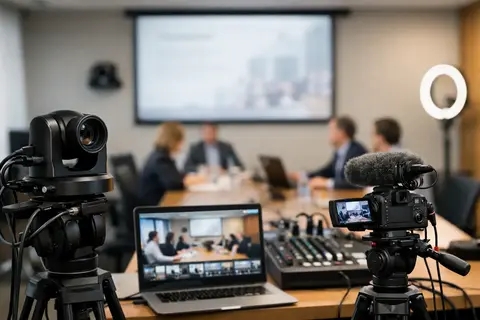
Mistakes in a conference recording are usually not obvious right away. They become clear after the event, when the speaker’s voice is quiet, the slides are overexposed, or the camera is set to too tight a framing. That is why a conference video recording equipment example is not just a list of gear - it is a thoughtfully assembled set in which every part works together with the others.
If the goal is to get a professional recording for a company event, seminar, or panel discussion, the most convenient way to start choosing equipment is from three basic blocks: image, sound, and a stable workflow. The third point is often underestimated. A camera alone will not save a conference if there is no reliable audio connection, power supply, and backup solution.
In brief
- Build a kit around three blocks: image, sound, and safety.
- Audio is the priority — connection from the sound mixer + backup recording and headphone monitoring.
- Choose a camera based on continuous operation, power options, and convenient manual control, not just megapixels.
- Tripods, power, and memory cards are the most common failure points — plan backup solutions.
- One camera is enough for simple lectures; 2–3 cameras are needed for panels, reactions, and live streams.
What to choose for different tasks
| Task | Solution | Why |
|---|---|---|
| Single-camera recording for a lecture or presentation | Mirrorless camera or camcorder with a versatile zoom lens, sturdy video tripod, audio from the mixer or a wireless microphone, two memory cards | Simple setup and sufficient quality for editing; 4K provides cropping flexibility, while audio from the mixer ensures clear speech |
| Panel discussion or multi-speaker format | At least two cameras (wide shot + close-ups), additional room microphones or separate lavalier microphones for each speaker, external audio recorder, monitoring | Multiple cameras improve editing and provide backup material; separate microphones preserve each speaker's sound quality |
| Live stream with slide projection or a screen in the background | Camcorder with continuous power (AC adapter), controllable LED lights, reliable HDMI output or a video capture solution, backup recording | In a live stream there is no time to repeat the scenario — stable power and proper light reduce issues with overexposed slides and camera overheating |
| Large conference with audience reactions | Three or more cameras in a network configuration (fixed framing and operator cameras), professional video head on a tripod, audio from the mixer + room microphones, file management plan | More angles provide dynamic editing and safety in case of technical problems; file management reduces chaos after the event |
| Rare or one-time video needs | Rental from a reliable service provider — a camera kit with audio solution and lights, plus an option for technical support | Rental provides flexibility and access to more expensive equipment without investment when events are infrequent |
| Recording safety and backups | Dual recording to two memory cards or a parallel external recorder, backup batteries/AC power and monitoring headphones | Materials from a one-time corporate event cannot be repeated — backup recordings reduce the risk of losing content |
Conference video recording equipment example in practice
The most practical solution for a small or medium-sized conference is usually one main camera, a separate audio recording from the sound mixer or microphones, a stable tripod, and controllable lighting if the venue requires it. Such a setup makes it possible to record the presentation without complex directing, while still producing material of sufficient quality for editing and publication.
A typical example may look like this: a mirrorless or professional video camera with clean HDMI output and unlimited or long recording time, a universal zoom lens, a sturdy video tripod, an external audio recorder, a wireless microphone or a connection to the sound mixer, headphones for monitoring, and at least two memory cards. If the event takes place in a room with uneven lighting, the kit is supplemented with LED light panels or compact lights for the speaker area.
That is enough for most corporate events. But everything changes if you need multiple angles, a live-streaming option, or a safe backup recording. Then one camera is already the minimum threshold, not the optimal solution.
Camera - not just resolution, but operational reliability
In conference recording, the camera choice is determined not by the maximum frame rate, but by stability during long operation. It is very important that the camera can record without overheating, supports continuous power, and offers convenient manual exposure control. 4K recording is often a desirable choice because it gives more room for cropping in editing, especially if you are working with one camera and later want to imitate a close-up.
The lens is just as important here as the body. In a conference hall, it is rarely possible to move around freely, so a universal zoom lens is usually more practical than a prime lens. If filming is done from the back of the room, a longer focal length will be needed. If the camera is closer to the stage, a standard range will be enough. A lens that is too wide can create an empty frame with too much unnecessary space, while a lens that is too narrow will make composition difficult if the speaker moves around.
Video cameras have their own advantages. They often offer more convenient ergonomics, longer continuous operation, built-in ND filters, and more professional audio solutions. Mirrorless cameras, on the other hand, provide greater flexibility in lens choice and often higher image quality for the price. The choice depends on the work scenario, not just on the specification sheet.
Audio is more important than the image itself
A viewer will forgive a slightly darker image sooner than unintelligible speech. That is why a good conference video recording equipment example always starts with a reliable sound chain. Ideally, audio is taken directly from the event sound mixer and a backup recording is provided in parallel.
If the event already has a sound team, the safest option is to coordinate a connection from the mixer to an external audio recorder or camera. This provides a cleaner signal than relying on the camera’s built-in microphone. However, it should be taken into account that a mixer signal does not always reflect everything happening in the room. Questions from the audience or room reactions may not be heard clearly enough. In such cases, an additional room microphone or a second recording channel is useful.
If a sound mixer is not available, the solution is wireless microphones for the speaker or tabletop microphones for panel discussions. Here, you should not look only at range and brand. Frequency stability, receiver placement, and the ability to switch quickly if there is interference in the room are also important. In a professional conference environment, a backup microphone is not a luxury but sensible security.
Headphones for monitoring are mandatory. Without them, the operator often notices audio problems only after the recording. By then it is too late.
Lighting - not always needed, but sometimes decisive
In many conference halls, the lighting is designed for the live audience, not for the camera. There may be high-contrast spotlights on stage, a bright LED screen in the background, but the speaker’s face may be too dark. In such a situation, a camera with a good dynamic range helps, but there is always a limit.
If the venue allows it, a small LED lighting kit can significantly improve the result. The main goal is not to turn the conference into a studio. The aim is to even out skin tone and reduce harsh shadows without drawing attention to the light itself. That is why controlled, quiet, and quickly set up LED lights with adjustable power and color temperature work best for conferences.
If the room is large and lighting placement is not practical, then the camera position becomes much more important. Sometimes moving a few meters solves more than an extra light fixture.
Tripods, power, and recording safety
It is the accessories that determine whether everything will run without stress on the day of the event. Conferences require a sturdy video tripod with a fluid head, not a lightweight photo tripod intended for occasional use. If the operator follows the speaker or slowly reframes the panel, the quality of the video head will be visible immediately.
The power solution should be assessed in advance. One battery rarely lasts for a full event, especially if the recording is 4K. It is more practical to use an AC adapter or an external power solution if the camera supports it. The same applies to the audio recorder, monitor, and wireless systems.
Memory cards should not be a last-minute purchase. In conference recording, not only capacity but also reliability and writing speed matter. If the camera supports dual recording to two cards, this feature is worth using. Especially when it comes to a one-time corporate event without the possibility of repeating the content.
When you need one camera and when two or three
With one camera, you can record a lecture, training session, or presentation in good quality if the speaker is the main focus and dynamic editing is not required. This solution is more economical, faster to set up, and easier to manage. It is a good starting point for companies that want to document events without a full filming crew.
Two cameras become useful as soon as reaction shots, a wide view, and a reliable backup are also important in case one device encounters a technical problem. One camera can remain in a fixed wide shot, the other for close-ups. This significantly improves editing options and reduces risk.
Three cameras or more are usually needed for panel discussions, larger conferences, and events with screens, audience participation, or live-streaming requirements. At that point, you need to think not only about recording, but also about the operators’ work, video switching, coordinated settings, and file management.
Buying or renting such a setup
If conference recordings are a regular part of the work, owning the equipment often pays off faster because the team becomes familiar with a specific system and preparation time decreases. This is especially important for marketing teams, agencies, and companies that frequently organize internal or public events.
Rental, on the other hand, is a logical choice if events are rare, requirements differ each time, or higher-end equipment is needed for a specific project. For example, one time one camera and an audio recorder are enough, but another time multiple cameras, a teleprompter, additional lights, or wireless audio systems are required. In such cases, flexibility is more important than ownership.
That is why it is practical to work with a partner who can not only provide the equipment, but also help put together the right setup for a specific venue and task. Master Foto is useful in this regard as a local solution for those who value both purchase and rental, as well as clear advice on compatibility and real-world use.
How not to choose too much or too little
The most common mistake is overpaying for features that will not be used in conference recording. If there is no need for cinema-level color grading, there is no need to build a setup only around complex codecs. If there is no operator working with a gimbal, there is no point in including it in the basic kit just because it looks impressive.
The opposite extreme is an overly simple solution. One cheap microphone and a camera without backup power may seem sufficient until the event lasts four hours and the final session is left without sound. In conferences, much happens only once, so reliability is usually more valuable than theoretical savings.
A good setup is one that can be installed on time, launched reliably, and taken down predictably after the event. If you are choosing a conference video recording equipment example for your project, think not only about the camera, but about the entire system - from the audio input to the last memory card. That is usually where the difference arises between a simply recorded event and material that can truly be used without compromise.
Frequently asked questions
Why is audio more important than image in conference recording?
Viewers more often forgive visual flaws than unintelligible speech. If the speech cannot be heard or understood, the content loses value regardless of image quality. Therefore, it is recommended to prioritize the audio connection from the sound mixer and backup recording.
Is 4K recording mandatory for conferences?
4K is not mandatory, but it gives greater flexibility in editing and cropping, especially if you are working with one camera. File sizes and the required storage capacity also need to be considered. If the material is mainly for the internet and archive storage, high-quality Full HD may be sufficient.
How often should I use headphone monitoring?
Headphone monitoring should be a permanent part of the device throughout the recording. It allows you to immediately notice cable problems, interference in frequencies, or low levels. Without monitoring, audio failures are often discovered only after the event.
When is one camera enough and when are multiple cameras needed?
One camera is suitable if the speaker is fixed and dynamic editing is not needed. If you want close-ups, reaction shots, or a safe backup recording, add a second camera. A configuration with three or more cameras is recommended for panels, large conferences, or live streams.
How do I make sure the camera does not shut off during a long recording?
Choose a camera with the possibility of continuous AC power or use an external power solution. Make sure the camera does not show signs of overheating during long 4K recording and test the settings before the event. Backup batteries should also be prepared in case AC power is not available.
Is it better to buy or rent equipment?
If recordings are regular, buying often pays off because the team gets used to the system and preparation time decreases. If events are rare or requirements change, rental provides flexibility and access to higher-end equipment. Often the best solution is to combine purchasing with flexible rental as needed.
Useful links
- Mirrorless cameras - Links to the mirrorless camera category to find suitable camera bodies for conferences
- Video filming equipment - General equipment range for video recording and professional conference needs
- Tripods - Choose stable tripods and video heads that ensure smooth framing
- Memory cards - Reliable and fast memory cards are important for long 4K recordings
- LED light panels - Controllable LED lights help even out skin tone and reduce harsh shadows
- Microphones - Choose lavalier or room microphones to ensure clear speech recording
- Teleprompters - Useful for presenters and live-stream scenarios where text display is needed
- Video equipment - Rental solutions for conventional kits and extra equipment for one-time projects