
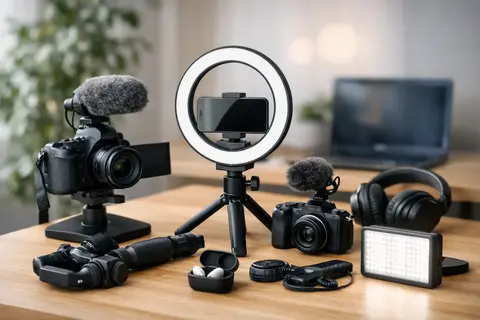
If a video is intended for Instagram Reels, TikTok, or a short ad clip, equipment selection usually breaks down not at the camera, but at the logic of the setup. That is exactly why an example of social media video equipment is more useful than a separate product list - it shows how the camera, light, sound, and stabilization work together to accomplish one specific task.
Content creators often start by asking which camera to buy. It is more practical to start elsewhere - what content will you film, how quickly does it need to be shot, and where will it be published. A vertical talking-head video requires a different setup than a product demo, interview, or dynamic backstage material. This is where properly chosen equipment saves time in editing and reduces reshoots.
In brief
- Priority: light and sound often improve quality more than a more expensive camera.
- Start with a simple kit — smartphone, LED light, clip-on microphone, and tripod.
- If you film regularly, move to a mirrorless camera, a sturdy tripod, and a more powerful LED light.
- For moving content, choose a gimbal or compact handle and a wireless microphone.
- Try renting before a costly purchase if the equipment is only needed for projects.
What to choose for different tasks
| Task | Solution | Why |
|---|---|---|
| Beginner — quick start kit | Smartphone, compact LED panel with diffusion, clip-on microphone, and phone tripod | Quick setup and a simple workflow let you film, edit, and publish on one device. Investing in light and sound improves the result the most. |
| Regular content creator (several times a week) | Mirrorless camera with a versatile lens, external microphone, sturdy tripod, and one more powerful LED light | Better image control, more reliable autofocus, and flexibility in lens choice ensure consistent quality for everyday shooting. |
| Moving content — events, behind the scenes, outdoors | Compact camera or smartphone with a gimbal, wireless microphone, and on-camera light | Gimbals and wireless audio provide smooth motion and clear voice, which significantly improves the viewing experience in dynamic shots. |
| Product demonstrations and small spaces | Versatile lens with a flatter sharpness profile, soft LED light with diffusion, and a tripod with adjustable height | Controlled lighting and a predictable frame reduce reshoots and let you highlight details without excessive background blur. |
| Interviews and talking heads | Clip-on microphone or directional microphone, soft portrait light, and a sturdy tripod or light stand | Audio quality and even facial lighting are crucial for perception; even a small lighting improvement makes the video look more professional. |
| Short-term projects or one-off projects | Consider renting — light kits, teleprompters, gimbals, or professional cameras for the duration of the project | Renting lets you test equipment and workflows without large upfront investment, so you can make a more informed purchase decision later. |
When an example of social media video equipment really helps
An equipment example is useful at the moment when you need not theory, but a clear starting point. This is especially true for small businesses, marketing teams, solo content creators, and those who film themselves without a separate operator. In such conditions, the priority is usually a predictable result rather than a maximally technically complex setup.
A good social media kit is usually based on four elements. The first is a camera or smartphone that provides sufficient image quality. The second is light, because even a good camera will not deliver a convincing result in poor lighting. The third is a microphone, because audiences are more likely to forgive imperfect image than bad sound. The fourth is stabilization - a tripod, handle, or gimbal depending on the type of shooting.
Example of social media video equipment for a beginner
If the goal is to start quickly and without excessive costs, a basic kit can be very effective. In this scenario, a quality smartphone, a small LED light, a wireless or wired lavalier microphone, and a tripod with a phone holder are enough. Such a solution works well for expert advice videos, product demonstrations, simple promotional recordings, and everyday content publishing.
The advantage of a smartphone is speed. Filming, framing, editing, and publishing all happen on one device. The drawback is limited control over optics, dynamic range, and work in more difficult lighting. That is why at this level it is most worth investing in light and sound, rather than trying to compensate for everything with a more expensive phone.
For the talking-head format, one soft LED panel or a compact light with diffusion is enough. If the face is evenly lit and there is no complete darkness in the background, the video already looks much more professional. The microphone plays a decisive role here, because social media videos are often watched with headphones, and bad noise, echo, or uneven levels are immediately noticeable.
Equipment kit for regular content production
If content is created several times a week, a phone eventually becomes too limiting. Then the next justified step is a mirrorless camera with interchangeable lenses, a universal lens, an external microphone, a sturdy tripod, and at least one more powerful LED light. This is already a working kit, not just a start.
A mirrorless camera offers several advantages. Autofocus is usually more reliable, the image is more flexible, and lens choice allows the frame to be adapted to specific content. For example, a 24-70 mm equivalent range is practical for product videos, interviews, and office content. Meanwhile, a wider lens helps when filming in small spaces where it is not possible to step back.
At this stage it is important not to overvalue cinema aesthetics if content must be produced quickly. Very shallow depth-of-field shots look good, but focusing errors on social media cost more than a slightly blurrier background. Therefore, for commercial everyday videos, a balanced setting with sufficient sharpness reserve is often safer than maximum background blur.
What to choose for dynamic content
If the content is made in a store, at events, backstage, or on the street, the requirements change. Here the need for mobility, quick stabilization, and a reliable audio solution in motion appears. In such a scenario, a good example of social media video equipment would be a compact camera or smartphone with a gimbal, a wireless microphone, and a small on-camera light.
A gimbal provides smoother movement, but it is not a universal solution for all shots. If the content is spontaneous and you need to react quickly, sometimes a simple handle or a camera with good built-in stabilization is more practical. A gimbal requires balancing, charging, and some discipline in use. If the team is small or one person is filming alone, an overly complicated kit can slow down the process.
Wireless microphones are almost mandatory here, especially if the speaker is moving. They make it possible to maintain clear voice even when the camera is farther from the speaker. However, one must account for radio interference, battery management, and the need to monitor recording levels. That is why simplicity is often an advantage in practice.
Light is more important than it first seems
Social media does not necessarily need a large studio, but it does need predictable light. It is precisely predictability that makes content consistent from one video to the next. If one day you film by a window, the next under ceiling lights, and the third in semi-darkness, the overall visual impression of the account becomes uneven.
The most practical solution is usually LED lights with adjustable power and color temperature. For a small table video, a compact panel is enough, but for a portrait of a person and product content, a light with a diffuser works better. Softer light allows more mistakes, is more pleasant for skin, and reduces harsh shadow contrast.
There is one important compromise here. A compact light is convenient and quick to set up, but it often lacks power for larger rooms or for working in daylight. If content is created regularly, more powerful lighting pays off not only in image quality, but also in shooting stability.
Audio choice determines perceived quality
In many cases, the viewer forgives average framing, but not poor voice quality. That is why audio should be treated as core equipment, not an add-on. If a person is speaking to the camera, the safest solution is a lavalier microphone. If you need to film room ambience, product sounds, or short lines, a directional microphone on the camera or a separate audio recorder solution is useful.
The room must be taken into account. An empty office with hard walls can sound worse than a smaller but more softly furnished room. In such conditions, an expensive microphone will not always solve the echo. Sometimes better placement, a closer microphone, and a basic improvement of room acoustics during filming give a greater effect.
When to buy equipment, when to rent it
Not everything has to be purchased at once. If content is filmed periodically or is needed for a specific project, renting is a pragmatic solution. This especially applies to more expensive light kits, teleprompters, stabilizers, more professional cameras, or specific lenses. This makes it possible to test the workflow before making a purchase decision.
Buying is logical when a specific piece of equipment is used regularly and directly saves time in daily work. For example, a tripod, microphone, and basic light are everyday tools for most content creators. Meanwhile, a second camera, a specialized macro lens, or a larger gimbal is often project-based equipment. Here flexibility is more important than ownership.
That is why a professional retailer with rental options is also a convenient model for companies that do not want to build a full equipment park right away. If you need one stable everyday kit and the option to add extra gear for a larger project, such an approach is economically justified.
How not to overpay for the wrong kit
The most common mistake is overpaying for the camera body and neglecting the rest of the system. For social media, the result is very often determined not by the most expensive camera, but by the right balance between image, light, sound, and workflow speed. If you film alone, convenient mounts, reliable batteries, sufficient memory cards, and simple file transfer are especially important.
The second mistake is buying overly complex equipment for future needs. If today you film vertical expert videos in office spaces, there is no need to build a cinema-level system. It is much more rational to choose a kit that allows you to publish content consistently now, and only then expand it based on real need.
If you need to choose between several scenarios, it is worth thinking not in products, but in tasks. Will you film yourself alone, or will there be an operator. Will the content be static or moving. Is the priority speed, or image flexibility in post-production. These are exactly the questions that determine which example of social media video equipment is right for you.
The most practical start is usually not the most expensive kit, but the one you will truly use every week. If the equipment helps you film faster, more clearly, and with less risk of error, it is already doing its job.
Frequently asked questions
Is a smartphone still good for getting started with social media videos?
Yes — a smartphone is an ideal starter tool because it combines filming, editing, and publishing in one device. More important than the camera is good light and clear audio.
What should I invest in first — camera, light, or microphone?
It is recommended to invest in light and a microphone first, because they affect perceived quality the most. A better camera comes as a second step if you need more flexibility and image control.
When is it better to rent equipment instead of buying it?
Renting is a good choice if the equipment is needed only for a specific project or if you want to try more expensive gear before buying it. It lets you test the workflow and choose a well-founded purchase later.
Is a gimbal mandatory for moving content?
A gimbal provides very smooth motion, but it requires balancing and an extra workflow. If you need quick reactions and simple operation, a compact handle or a camera with good built-in stabilization is often enough.
How do I solve echo problems in a room?
Echo is more often reduced by microphone placement, recording closer to the source, and simple improvements to room acoustics (rugs, curtains, soft furniture). Sometimes a more expensive microphone will not solve echo if the room is not adapted for recording.
How important are light consistency and color temperature?
Predictable light with adjustable power and color temperature ensures a consistent visual style in the account. It reduces the time spent on corrections and editing, and makes the content more consistent.
Useful links
- LED lights for camera - The article emphasizes adjustable LED light as the most practical solution for even and predictable lighting.
- Video stabilizers - For moving content, the article recommends a gimbal or compact handle, so the stabilizers category is useful for choosing.
- Microphones - The article stresses that audio often determines perceived quality, so the microphone section helps choose clip-on and wireless solutions.
- Mirrorless cameras - When content becomes regular, the article recommends moving to a mirrorless camera with interchangeable lenses, and this category matches that step.
- Background kits with holder - The article mentions background stability and a uniform visual look; a background kit with holder helps ensure consistency.
- Photo backgrounds - A well-chosen background and constant lighting are mentioned in the article as important elements for product and portrait video quality.