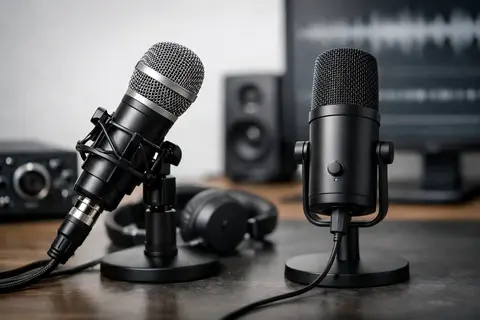
If a voice sounds flat, with background noise or uneven levels in a recording, the problem is often not just the microphone, but the entire chosen system. That is exactly why the question of xlr or usb microphone is not theoretical - it affects recording quality, ease of work, and how easily your audio setup can be expanded later.
In brief
- USB microphone — a fast and easy start: plug in, record, suitable for solo podcasts, voice-over, and streams.
- XLR microphone — a modular and expandable solution: requires an interface/mixer, but offers better control and upgrade options.
- The choice should be based on the use case: room acoustics, number of participants, need for multichannel recording, and future expansion.
- Sound quality is determined by the entire chain (microphone, preamp, gain, positioning, acoustics), not just the XLR or USB connection.
- When comparing budgets, consider system costs — USB is often cheaper upfront; XLR requires additional accessories, but pays off in the long term.
What to choose for different tasks
| Task | Solution | Why |
|---|---|---|
| Solo podcast or Zoom calls | USB microphone | Quick setup, limited equipment, and sufficient sound quality for one speaker. |
| Multi-participant podcast in one room | XLR microphones with an audio interface or mixer | More convenient routing, separate gain adjustment for each channel, and a better ability to add accessories. |
| Voice-over and studio recordings with high demands | XLR condenser or specialized studio microphone + good preamp | High-quality preamps and separately selected chain elements improve detail and dynamics. |
| Outdoor interviews and field recordings | XLR dynamic microphone and portable recorder | Dynamic microphones are more resistant to background noise, and XLR lets you use professional field equipment. |
| Streamer with a simple workspace | USB microphone or single-channel XLR kit | USB reduces the number of devices on the desk; the XLR option gives a more professional path if you plan to expand. |
| Video filming where audio must be synchronized with the camera | XLR microphones integrated into the camera recording chain or a separate audio interface | An XLR system fits better into filming equipment chains and provides multi-platform synchronization. |
Frequently asked questions
Does XLR always mean better sound than USB?
No — sound quality is determined by the entire recording chain, not just the cable type. A cheap XLR microphone with a weak interface can sound worse than a high-quality USB model with a good capsule and correct settings.
When should I choose a USB microphone?
Choose USB if you need a quick setup, recordings are made for one speaker, and there are no plans to expand the system to multiple channels. It is a good solution for streams, online courses, and beginner podcasts.
When does an XLR solution pay off?
XLR pays off when audio is a regular, professional part of the job and flexibility is needed, such as multi-microphone recording or higher-quality preamps. It lets you gradually improve individual chain components.
Does a condenser microphone always need phantom power?
Most studio condenser microphones require +48V phantom power, which is provided by an audio interface or mixer. There are also USB condenser microphones with built-in power that do not use external phantom power.
Can I combine USB and XLR microphones in one project?
In a direct connection, they usually are not combined directly, because USB microphones work as separate devices with their own conversion. To synchronize multiple devices, an separate audio interface with multiple XLR inputs or software synchronization methods is usually used.
How can I improve sound regardless of the chosen connection?
Pay attention to microphone position, room acoustics, gain settings, and post-processing. A pop filter, correct distance to the capsule, and isolation from echo effectively improve the result.
Useful links
- Microphones - A wider microphone selection for both USB and XLR solutions.
- Podcast microphones - Recommendations and models specifically for podcasts and single-channel recording needs.
- For streaming - Equipment and accessories that make online streaming and live broadcasting easier.
- Audio equipment - Interfaces, preamps, and other solutions for building XLR systems.
- Sound recorders - Portable recorders for field work and interviews with XLR connection options.
- Video filming equipment - Integration between audio and video equipment for filming and synchronization.
For content creators, podcasters, remote interview recorders, and videographers, this choice usually starts with one practical need - a clear voice without unnecessary complexity. But USB and XLR microphones are not simply two different connection types. They imply a different working approach, a different equipment chain, and different possibilities for the future.
XLR or USB microphone - the main difference
A USB microphone is the simplest solution. In it, the microphone capsule, preamp, and audio interface are usually already combined in one body. You connect it to a computer, select the device in your recording software, and can start working. This is convenient, especially if recordings happen at a home workstation, in a small studio, or on the go.
An XLR microphone works differently. By itself it is not a complete solution - it requires an audio interface, mixer, or recording device with a suitable XLR input. Such a system is modular. That means each stage can be chosen separately: microphone, interface, preamp, cable, and sometimes additional signal processing.
This modularity is exactly the advantage of XLR, but at the same time also the more complicated part for a beginner. USB is usually a faster start. XLR is more often a long-term investment.
When a USB microphone is the more logical choice
If the priority is to start recording quickly, a USB microphone in many cases is the more rational purchase. For remote meetings, simple voice-over recordings, streaming, online courses, and a first podcast, it often provides more practical benefit than a more complicated XLR system.
A USB microphone usually means lower additional costs. There is no need to buy an audio interface right away, there is no need to think about phantom power for condenser microphones, and setup takes less time. Many models also offer direct headphone monitoring, gain control, and even multiple recording modes. For a user who does not want to delve into the audio signal chain, this is a significant advantage.
However, limitations should also be taken into account. The electronics of USB microphones are integrated, so the preamp or interface cannot be upgraded separately. If later there is a need to record two or three microphones, more complex routing, or higher-end signal processing, a USB solution can become too restrictive.
When an XLR microphone pays off more
An XLR microphone is usually the better direction when audio is an essential part of the work, not just an addition to video or online communication. This applies to regular podcast recording, interviews with multiple participants, studio voice-over, music recording, and more professional video production.
The main benefit is control. With a good audio interface, gain can be managed more precisely, higher-quality preamps can be used, and a microphone specifically suited to the task can be selected. If the workspace is not ideal, for example if there is echo or background noise, a properly chosen XLR dynamic microphone together with a suitable interface often gives a more predictable result.
An XLR system also grows with your needs. Today you can use one microphone and a simple interface, but later add another microphone, better headphones, an external processor, or another recording environment. If technology is part of a professional workflow, this flexibility is essential.
Sound quality - XLR does not always win
It is easy to assume that XLR always means better sound. In practice, it is not always that simple. A cheap XLR microphone with a weak interface and incorrectly set gain can sound worse than a quality USB model.
The sound result is affected by several factors: microphone type, distance to the speaker, room acoustics, recording level, and post-processing. If you speak too far from the microphone or record in an empty, echoey room, even a very good model will not deliver the expected result.
That is why it is important to look not only at the connection, but at the entire usage scenario. A USB microphone in a quiet room, placed correctly and used with a pop filter, can deliver a very convincing voice. Meanwhile, an XLR system shows its advantage when the user makes use of its potential and understands how to set it up.
XLR or USB microphone for podcasting, video, and streaming
For podcasts, the choice depends on the format. For a solo podcast or remote recording, a USB microphone is often completely sufficient. It allows you to quickly create a stable workspace without extra hardware. If several people regularly participate in a podcast in the same room, an XLR solution is usually more convenient and technically correct.
For video creators, the situation is different. If the microphone is used mainly for voice-over recordings at a computer, USB is practical. If audio needs to be integrated into the filming process, interviews, or a studio setup together with other devices, an XLR system fits better into the overall equipment chain.
In streaming, ease of work is very important. Many streamers choose USB because it reduces the amount of gear on the desk and speeds up setup. But if streaming is regular and commercially important, an XLR setup often provides a more stable and professional base for the long term.
The price issue - look at the full setup
The price of a USB microphone should almost always be considered as part of the total startup cost. Often only the microphone itself and headphones are needed. That lowers the entry barrier.
With an XLR microphone, the scope is broader. You need not only the microphone itself, but also an interface, an XLR cable, possibly a stand, a pop filter, and closed-back headphones for monitoring. If you choose a condenser microphone, phantom power must be provided. As a result, the initial budget can be significantly higher.
That does not mean XLR is not worth it. It simply means you should look not at the price of one product, but at the system. If you know clearly that audio will become a regular work tool, the higher initial costs are often justified.
What to consider before buying
The first question is not which connection to choose, but where and how you will record. If recordings happen at one computer, one person speaks into the microphone, and quick setup is important, USB is a logical starting point. If you need flexibility, multiple sources, or integration with other audio gear, look toward XLR.
The second important factor is the room. In echoey rooms, an overly sensitive condenser microphone can create more problems than benefits regardless of whether it is a USB or XLR model. In such situations, a dynamic microphone often works better, especially for close-range voice recording.
The third is your technical readiness. Some users want to plug in and work. Others want to control every part of the signal chain and expand the system later. Neither of these scenarios is wrong, but they lead to different choices.
Which solution is right for you
If you are a content creator who needs to quickly get a clear voice for Zoom calls, courses, streams, or simple podcasts, a USB microphone will usually be the most rational option. It lets you focus on content rather than configuring the audio chain.
If you work on regular client projects, record multiple speakers, edit more professional audio, or plan to gradually build a studio-level setup, an XLR system will be a safer long-term foundation. This is exactly where specialist advice is also useful, because the right combination of microphone type, interface, and accessories affects the result more than loud marketing promises.
For the typical Master Foto client, this choice is rarely just about the microphone. It is a choice between a fast, simple work tool and an expandable audio system that adapts to growing requirements.
If you are currently hesitating between the two options, think not about which sounds more professional on paper, but about which solution you will use correctly and regularly - that is what delivers better sound in practice.