No products
 Facebook
  Google
- Write a review
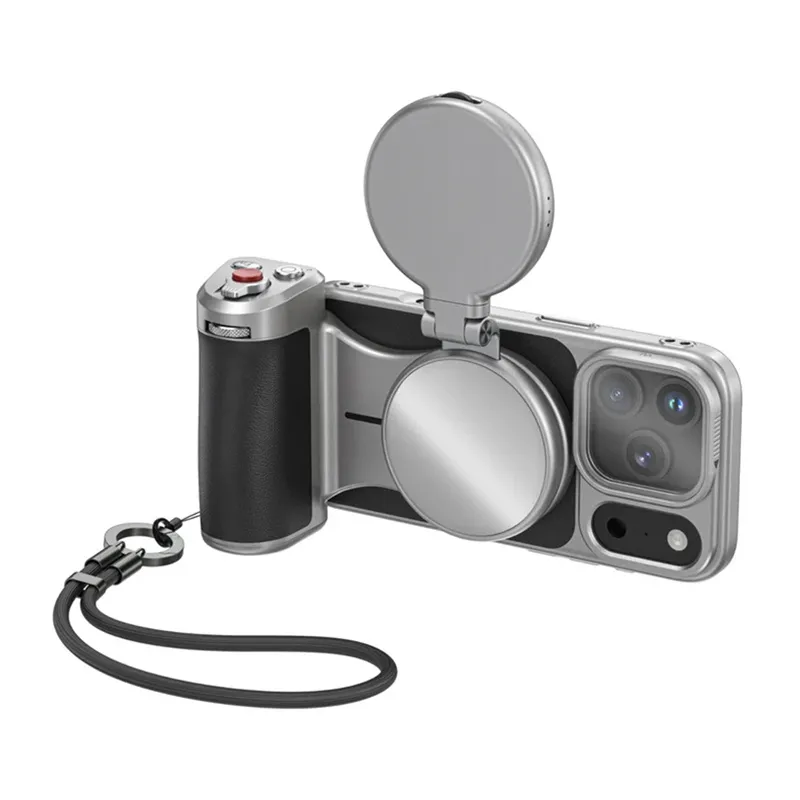
TELESIN Master Grip Mount for iPhone 17 Pro Max All-in-One Kit with Light


 AI ASSISTANT CHAT
Or ask about:
| Type of Product | Accessories for smartphones |
| Compatible | MagSafe-compatible |
| Compatible | Apple iPhone 17 Pro Max |
TELESIN Master Grip Creator Combo for iPhone 17 Pro Max
The TELESIN Master Grip for iPhone 17 Pro Max combines an ergonomic grip, a 32 N MagSafe magnetic mount, a built-in 3,200 mAh battery and support for the Reef Color App. This kit also includes a magnetic fill light and a UV filter, so you can improve your shooting setup without buying these accessories separately. CNC-machined aluminium construction enhances durability and gives the grip a solid feel. The stated weight of 727.5 g applies to the complete set with a phone, providing stability but adding noticeable weight in the hand.
Stable grip and ergonomics
The ergonomic shape improves handling and helps you capture steadier shots without a gimbal. Measuring approximately 11.7 × 8.1 × 22.6 cm, the grip provides a substantial hold and greater control over framing. Its thumb rest is designed to reduce accidental screen touches, lowering the risk of exiting the camera app while recording.
32 N MagSafe magnetic mount
The 32 N magnetic attachment has a stated holding capacity of approximately 3.2 kg. It helps keep the iPhone securely mounted while moving or recording one-handed, while still allowing the phone to be attached and removed quickly.
Battery and charging
The built-in 3,200 mAh battery can extend the iPhone’s operating time without interrupting recording. The grip functions as a power bank and supports magnetic charging while the phone is in use. This is useful for power-intensive tasks such as 4K recording. The manufacturer states that it can extend recording time by up to approximately one hour.
Passive graphene cooling
A 7,600 mm² graphene surface helps dissipate heat from the phone. Ventilation openings improve airflow to support stable performance. The manufacturer claims approximately 25% greater cooling efficiency; this figure is approximate. Cooling is passive, with no fan, so it operates silently and does not consume additional power.
Camera-style controls
The grip has a two-stage shutter button similar to those on traditional cameras. A half-press focuses and locks exposure, while a full press takes a photo or starts recording. These controls provide more direct control over a shot and make it easier to respond quickly in challenging lighting without using the touchscreen.
Precise zoom control
An integrated dial and zoom slider let you adjust framing without touching the screen. In photo mode, zoom can be adjusted in 0.1× increments. In video mode, the app enables smooth, cinematic zoom from 1× to 3×, useful when natural-looking movement is important.
Reef Color App
Pairing the grip with the Reef Color App unlocks access to filters, settings and extended control using the buttons and dial. Basic functions work without the app, but customisation options are limited.
UV filter, light and construction
The included UV filter helps protect the lens and can reduce the effect of ultraviolet radiation. It is not a polarising filter and does not eliminate reflections. The magnetic fill light improves illumination in low-light scenes. CNC-machined aluminium and non-slip elements contribute to durability, stability and a secure, comfortable grip during frequent use.
Specifications
- Manufacturer: TELESIN
- Model: Master Grip Creator Combo
- Compatibility: iPhone 17 Pro Max
- Mounting: MagSafe magnetic
- Magnet strength: 32 N (approximately 3.2 kg holding capacity)
- Material: CNC-machined aluminium with non-slip elements
- Dimensions: approximately 11.7 × 8.1 × 22.6 cm
- Set weight (combo with phone): 727.5 g
- Battery: 3,200 mAh
- Charging: magnetic (MagSafe) and USB-C port
- Cooling: passive, with 7,600 mm² graphene surface and ventilation design
- Connectivity: via the Reef Color App
Included
- TELESIN Master Grip
- Case compatible with the grip
- Magnetic lighting lamp
- UV filter
- Wrist strap
- Charging cable
- User manual








