No products
 Facebook
  Google
- Write a review
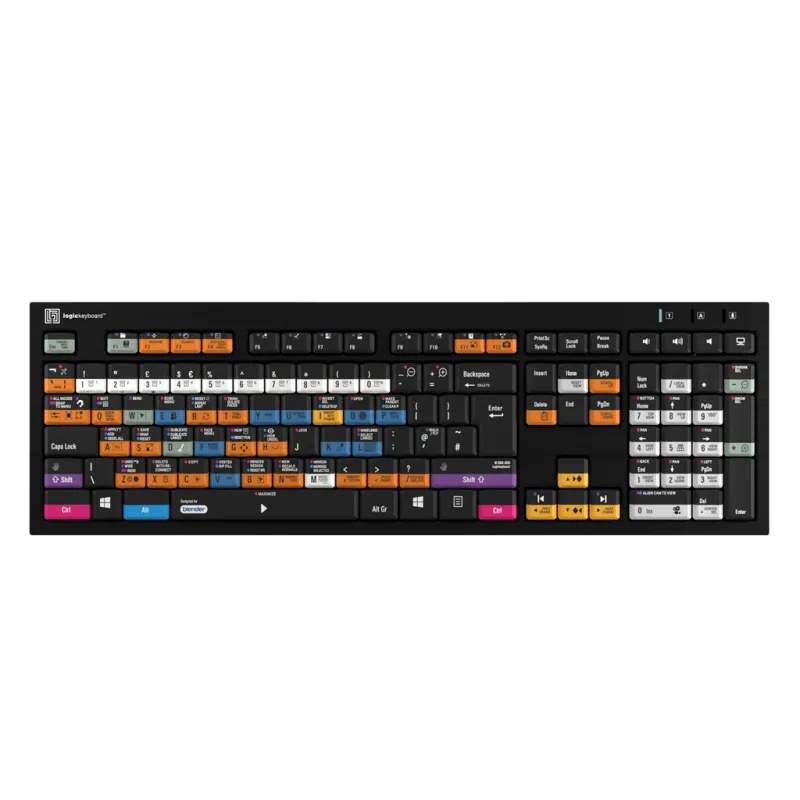
Slimline Logickeyboard designed for Blender. Made for Windows PC. This Logickeyboard is your number one choice when editing in Blender. The shortcut commands labeled on the keys, and their color-coded definitions makes you a Master of controlling Blender in no time. The Logickeyboard is ideal for 3D modeling studios, professional graphics environments, and everyone else working diligently with Blender.
LogicKeyboard Logic Keyboard Blender 3D PC Nero Line UK LKB-BLEN-BJPU-UK


 AI ASSISTANT CHAT
Or ask about:
| Type of Product | Video Mixer |
Slimline Logickeyboard designed for Blender. Made for Windows PC. This Logickeyboard is your number one choice when editing in Blender. The shortcut commands labeled on the keys, and their color-coded definitions makes you a Master of controlling Blender in no time. The Logickeyboard is ideal for 3D modeling studios, professional graphics environments, and everyone else working diligently with Blender.
This Logickeyboard is your number one choice when editing in Blender. The shortcut commands labeled on the keys, and their color-coded definitions makes you a Master of controlling Blender in no time. The Logickeyboard is ideal for 3D modeling studios, professional graphics environments, and everyone else working diligently with Blender.
Why shortcut keyboards?
Skip the time-consuming menu navigation and eliminate the need for memorizing keyboard commands. A Logickeyboard visualizes all the app shortcuts you need and puts them right at your fingertips. This translates into higher productivity and more time for creativity.
Two built-in USB hubs
For your convenience the Logickeyboard is equipped with two built-in High-speed USB hubs for easy connection of peripherals, ex. jog/shuttle wheel, or the LogicLight keyboard lamp if working in dimmed light environments.
Robustly built for professional use
The design prioritizes reliability and longevity, making it a dependable tool for consistent, high-performance usage in professional settings.
- NERO Slimline Logickeyboard
- Product and warranty information
- Cleaning Tissue
- Cleaning Instructions
- Designed for use with Blender
- 140+ intuitive and easily accessible shortcuts
- Two built-in USB 2.0 High-speed hubs
- USB wired connection
- Scissors switch keys with superior tactile feedback
- Number of keys: 108 (ANSI version) 109 (ISO version)
- Flip-out-feet to adjust typing angle
- Typing angle 8.5 with leg lift and 4.5 without leg lift
- Dimensions: 17.6 x 5.6 x 0.9 (446mm x 141mm x 23mm)
- Net weight: 29.6 oz (840 grams)
- 3 LED indicators for: Num Lock, Caps Lock and Scroll Lock
- High quality and robustly built for professional use
- Chassis color: Black
- Plug-and-play with Windows 10/11