No products
 Facebook
  Google
- Write a review
Important information!
From 19 November the store is moving to new premises at 151 Dzirnavu Street, Riga!
- 14 November - the last working day at 39 F.Sadovņikova street.
- The store will be closed on 16 and 17 November due to the move.
- From 19 November, we look forward to welcoming you at our new address.
OWC Dock I Thunderbolt 5 Dual HDMI Dock


 AI ASSISTANT CHAT
Or ask about:
| Type of Product | Other Accessories |
| Card type | Secure Digital SD |
| Card type | MicroSD |
| Connector | HDMI |
| Connector | Thunderbolt |
- 1. Evaluate your options.
- 2a. If you want to buy only one product with Aizdevums.lv leasing, then fill out the application here
- 2b. If you want to buy several items or use another leasing company, then put the items in the basket and choose the leasing service when ordering.
We offer leasing from Aizdevums SIA, Incredit SIA, ESTO.
Manager will check the availability of the items in the cart and send the loan application link. - 3. If you receive a positive response, contact us to purchase the product. Consultants will check the availability of the product.
- 4. If the product is available in the store or to be ordered from the warehouse, and you have received an affirmative answer from our consultants, please visit the store to proceed with purchase and leasing documents.
- 4a. You can also ask us to issue an invoice for this product and visit one of the leasing company branches to sign up leasing documents *..
- 5. Once the leasing documents have been signed up, you can receive the product in the store, if it is on site or inform our consultants and they will order it for you from the warehouse.
- *It is possible to arrange delivery for leased goods, so you can also perform the entire purchase process remotely.
**The sequence of leasing steps is the same for leases offered by InCredit Group.
***In case of doubt, contact our consultants!
When using leasing services, carefully evaluate your options to repay the loan!Lease
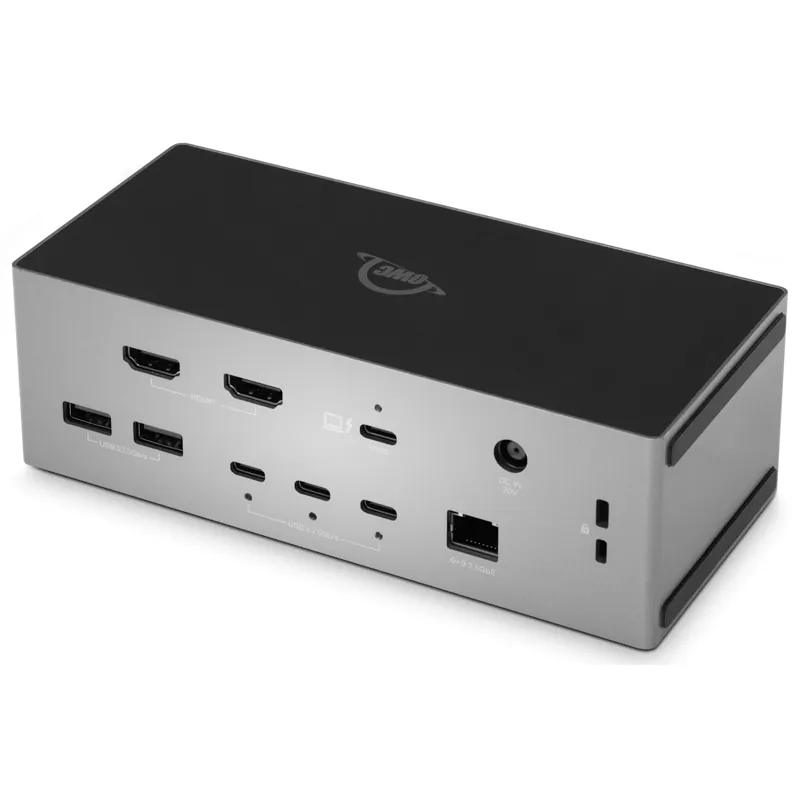
Two HDMI displays, no adapters
Connect HDMI monitors, televisions or reference displays directly to the OWC Thunderbolt 5 Dual HDMI Dock using its two integrated HDMI 2.1 ports. Each port has a dedicated controller, so the displays do not compete with each other for bandwidth. On Thunderbolt 5 host computers, the dock supports two displays at up to 8K at 60 Hz or two 4K displays at 240 Hz with DSC. A third display can be connected through the downstream Thunderbolt 5 port, supporting up to 6K at 60 Hz or 4K at 144 Hz.
One-cable workstation connection
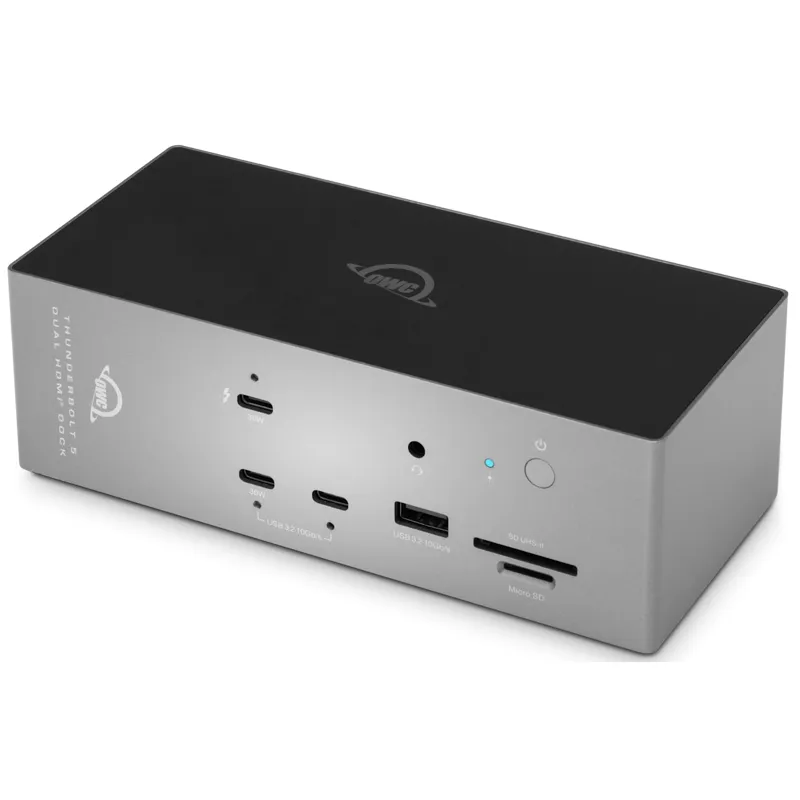
Connect the dock to your computer with the included 1 m Thunderbolt 5 cable to bring displays, wired networking, storage, card readers and connected accessories together. The dock supplies up to 140 W of power to keep demanding MacBook Pro and Windows laptops charged while the connected setup is in use. Its front USB-C port can also charge a phone or tablet at up to 30 W.
Ports and connectivity
- Two HDMI 2.1 ports for direct monitor connection.
- One downstream Thunderbolt 5 port for high-speed SSDs, RAID arrays and Thunderbolt storage enclosures, or for a third display.
- Eight USB ports: two USB-C and one USB-A on the front, plus three USB-C and two USB-A on the rear.
- 2.5 Gb Ethernet for NAS workflows, large file transfers and wired enterprise networks.
- UHS-II SD and microSD card slots for transferring camera media without a separate card reader.
Storage, cards and workflow
The downstream Thunderbolt 5 port supports high-speed external SSDs, RAID arrays and storage enclosures at their full rated speeds. Use the UHS-II SD and microSD slots to transfer captured media directly from memory cards. With OWC Atlas SD cards, the OWC Innergize software can check card health and remaining life, restore write performance affected by intensive use, and install firmware updates for compatibility with newer camera models.
Flexible placement and compatibility
Place the dock horizontally beside your keyboard or vertically to save desk space. It is compatible with Thunderbolt 5, Thunderbolt 4, USB4, USB-C and Thunderbolt 3 (Mac) host computers in Mac and Windows environments. The included OWC Dock Ejector software provides one-click disconnection of connected drives. A macOS driver is included for Apple SuperDrive support through the dock.
In the box
- OWC Thunderbolt 5 Dual HDMI Dock
- 1 m Thunderbolt 5 cable
- External power supply and power cable
- Digital support guide and user guide
- OWC Dock Ejector for Mac and Windows (digital download)
- OWC Innergize software for Mac and Windows (digital download)








