No products
 Facebook
  Google
- Write a review
Break free from the complicated setup and tangle of cables typically needed to connect cameras, computers, and switchers for multi-camera livestreaming. With just an iPad and a few mobile phones, the revolutionary Roland AeroCaster system will have you wirelessly switching and streaming on your favorite platform in minutes.
AeroCaster makes it easy and affordable for anyone to create a wireless multi-camera setup with pro-level production quality. Leveraging the A/V power of the mobile devices that everyone carries, our breakthrough system opens up a new world of creative possibilities for any livestreaming application, from online talk shows and music performances to live commerce, remote education, and beyond.
- Powerful wireless production solution with hardware control surface/audio interface and full-featured iPad app
- Switch up to four wireless devices simultaneously, plus the camera on the host iPad
- Supports wireless camera connections from up to four supported iOS and Android smartphones and tablets
- Wirelessly share screens from computers and mobile devices via the Google Chrome web browser
- Switch between cameras, media, and scenes with a variety of transition effects
- Save and recall 30 scenes with titles, graphics, and picture-in-picture windows
- Media pool for integrating video, audio, photos, and graphics stored on your iPad
- Stream directly to YouTube, Facebook Live, Twitch, and custom RTMP channels over Wi-Fi or 4G/5G cellular networks
- Follow viewer comments in the AeroCaster LIVE app
- Record program output and independent camera feeds while livestreaming or offline
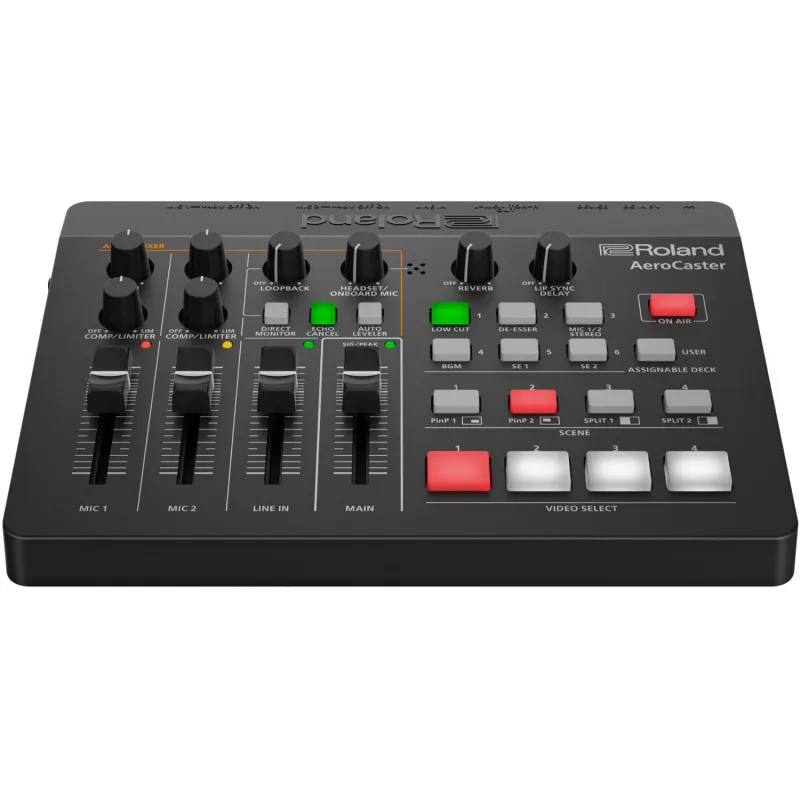
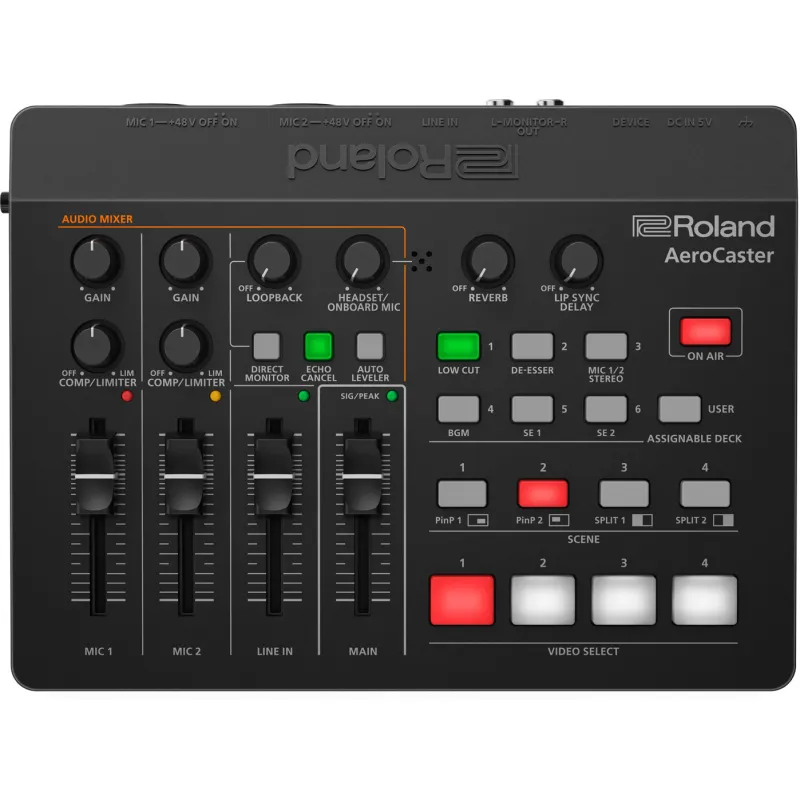
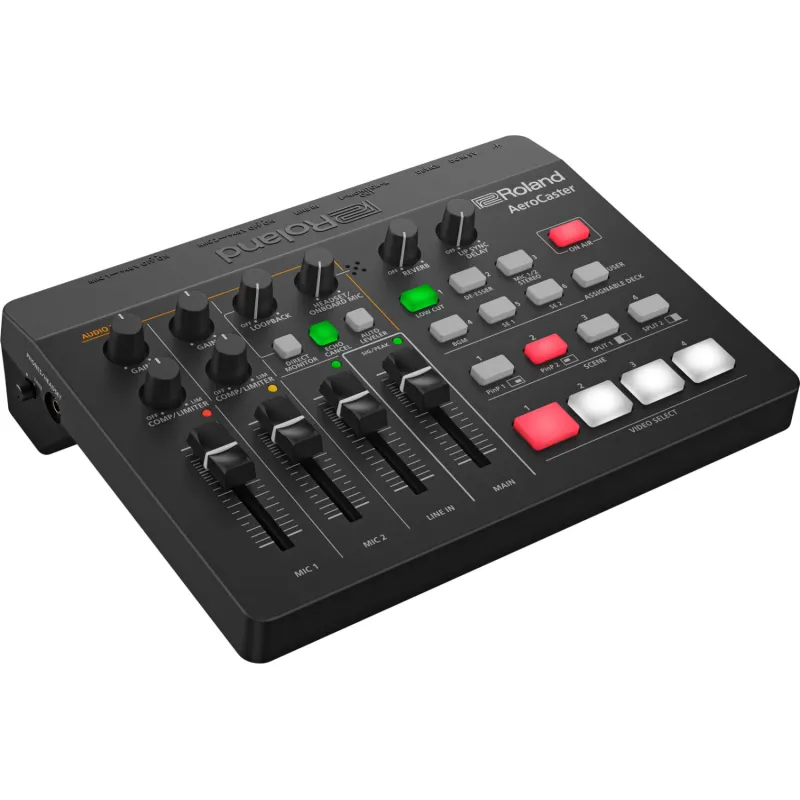
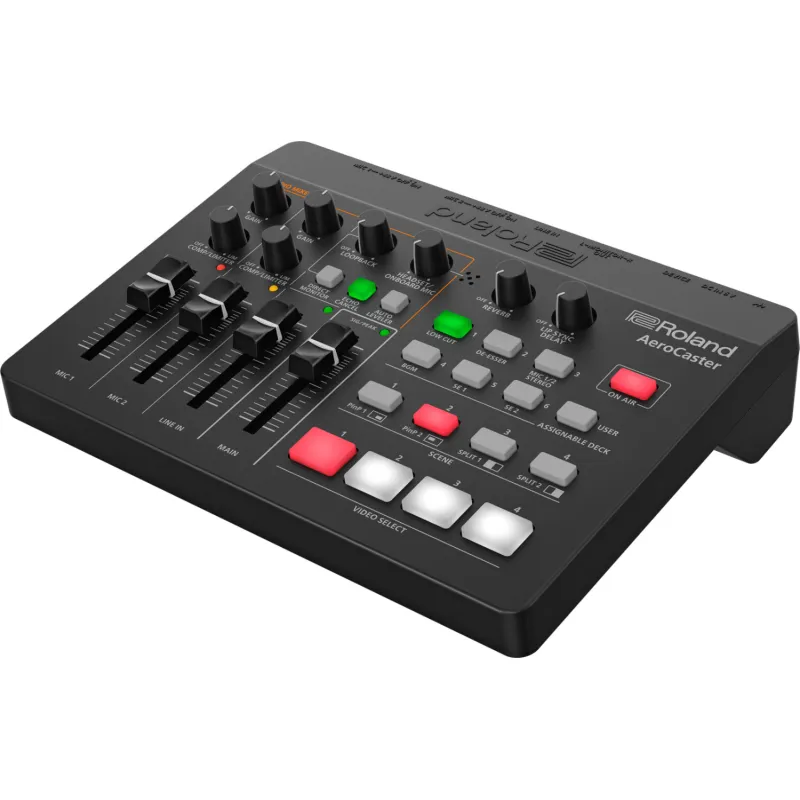
- Intuitive hardware control surface and audio interface with two XLR inputs, 3.5 mm stereo input, and headphones and monitor outputs

SYSTEM OVERVIEW
The Swiftest, Simplest Switcher Setup
AeroCaster is a super-powerful A/V switching system that’s incredibly versatile and easy to configure. In almost no time, you’ll be streaming multiple cameras and high-quality audio to YouTube, Facebook, Twitch, and custom RTMP channels over a Wi-Fi or 4G/5G cellular network.
The AeroCaster system consists of the AeroCaster LIVE app for iPad, the AeroCaster VRC-01 hardware control surface and audio interface, and the AeroCaster Camera app for iOS and Android mobile devices. BYOD screen sharing from computers and mobile devices is also supported.

AeroCaster Camera App

AeroCaster LIVE App

VRC-01 Audio Interface and Control Surface

Connect with Your Favorite Streaming Platform
AeroCaster provides an easy wireless connection to the leading streaming platforms. And your purchase of the system gives you full access to all AeroCaster features, with no subscription fee required.


Engage with Viewer Comments
When livestreaming on Facebook, YouTube, or Twitch, viewer comments are displayed within the AeroCaster LIVE app.

Capture Video from Five Sources
In addition to remote video capture from four mobile devices, you can access a fifth live video source using the camera on the iPad.

One-touch Changes with Scenes
Create up to 30 scene presets with text overlays, graphics (including transparent PNG files), adjustable picture-in-picture windows, or split-screen views.

Pro Video Effects Made Easy
Use cuts, cross-dissolves, and wipes for smooth, real-time transitions.

Access iCloud and iPad Media Content
Create titles and display video clips, photos, and graphics with data stored in iCloud or your iPad’s local media library.

The Camera You Need Is in Your Pocket
You don’t always need expensive DSLRs and camcorders for everyday video productions. With the AeroCaster system, you can take full advantage of the amazing cameras in the latest phones and use them as high-quality inputs for your livestream.

Easy Video Capture with Wireless Freedom
With all-wireless connectivity, you can use readily available stationary mounts to put the phones in places where it’s difficult to use a traditional camera. And with affordable gimbal mounts, you’re able to capture stabilized mobile shots from as far as your wireless network will reach.

Fine-Tune All Your Cameras from One Place
Once mobile devices are connected to AeroCaster LIVE, you have remote access to all their advanced camera settings from within the app. Balance and match the image between different phone cameras and control settings like focus, zoom, exposure, white balance, and more.

Record Program and ISO Video
Whether livestreaming or working offline, the flexible AeroCaster system lets you easily record productions for later editing and distribution. Capture the combined program output on the iPad and isolated video feeds on each phone. Then wirelessly transfer the phone videos to the iPad and put all the files together for post-production work in the app of your choice.

Wireless Screen Sharing with Google Chrome
AeroCaster LIVE also provides a simple solution for screen sharing from computers and mobile devices. Presenters can easily connect via the Google Chrome browser over Wi-Fi, with no cables, video adaptors, or dongles needed.

Combine Amazing Visuals with Great Sound
The AeroCaster hardware interface handles all your audio input and output needs with the power of a small broadcast mixer. Using simple and straightforward controls, one person can manage video switching and audio mixing all at once—with no prior production experience required.

Hear What Your Audience Hears
With the ability to monitor your audio mix through headphones or connected monitor speakers, you’ll know that your livestream viewers are hearing the content you’re delivering.

Stream with Top Audio Quality
The AeroCaster hardware features two combo inputs for connecting XLR microphones, electronic musical instruments, or a live sound console. And with a wide range of onboard effects, your talent will always sound their best. The headphones jack supports a feed from a headset mic or the mic on your earbuds for a third vocal source, and you can bring in additional audio from a mobile device or music player via the 3.5 mm stereo input.

Play Your Theme Music
From within the AeroCaster LIVE app, you have integrated access to media content stored on iCloud Drive. Play your opening theme to start the stream, trigger bumpers between breaks, or simply add some cool background music or sound effects whenever you like.*
Popular Applications

Music Performances
AeroCaster makes it easy for artists to connect with fans and build new ones with engaging multi-camera performance content. Grab shots from any angle and capture a high-quality stereo audio mix from the master console via the AeroCaster hardware.

Online Talk Shows
With AeroCaster, it’s never been simpler to set up and execute an online talk show or video podcast. Elevate your sound with pro broadcast mics, switch cameras among different presenters with a touch, and use the powerful onboard graphics tools to identify them with lower thirds. And with screen sharing via Google Chrome, it’s no problem to integrate charts, videos, and other content into your show as needed.

Live Selling
Entice buyers and pump up profits by presenting your products with the production quality they deserve. Mount phones to capture the perfect hero shots and demonstration views, then switch between them live with quick screen touches. Or display studio product stills, videos, and more by accessing content in your iPad’s media library.
A Growing System
AeroCaster is an evolving platform with a future roadmap for enhancing the system with new features and creative capabilities.
Connectors
MIC 1, 2 jacks: Combo (XLR, 1/4" TRS), balanced, phantom power (DC 48 V, 4 mA max)
LINE IN jack: Stereo miniature type
MONITOR OUT jack: RCA phono type
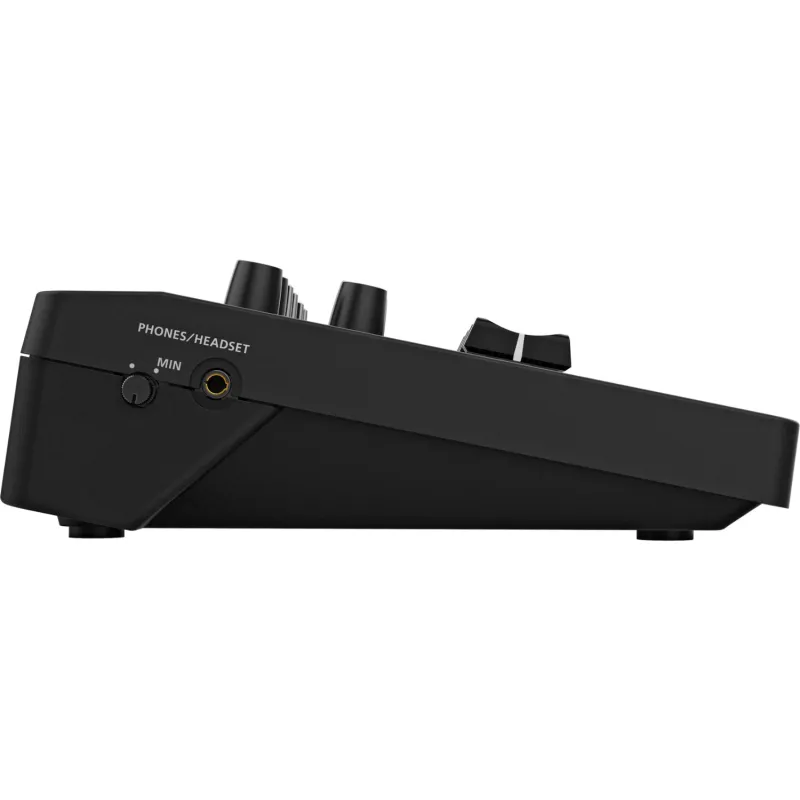
PHONES/HEADSET jack: Stereo miniature type (CTIA standard)
DC IN 5V port: USB Type-C
DEVICE port: USB Type-C
Controls
MIC 1, 2 LEVEL faders
LINE IN LEVEL fader
MAIN LEVEL fader
MIC 1, 2 COMP/LIMITER knobs
MIC 1, 2 GAIN knobs
LOOP BACK knob
HEADSET/ONBOARD MIC knob
REVERB knob
LIP SYNC DELAY knob
PHONES/HEADSET knob
MIC 1, 2 +48V switches
Indicators
POWER
DEVICE
SIG/PEAK
Audio Specs
Nominal Input Level:
MIC 1, 2: -60 to +4 dBu (Max: +24 dBu)
LINE IN: -10 dBu (Max: +10 dBu)
Input Impedance:
MIC IN: 10 kΩ (Gain < 24 dBu), 5 kΩ (Gain ≥ 24 dBu)
LINE IN: 15 kΩ
Nominal Output Level:
MONITOR OUT: -10 dBu (Max: +10 dBu)
PHONES/HEADSET: 15 mW + 15 mW (32 Ω load)
Output Impedance:
MONITOR OUT: 1 kΩ
Audio Effects
Delay
Reverb
HPF
Noise Gate
De-Esser
Compressor
Limiter
Power
USB AC adaptor (5V, ≥1.0 A recommended)
USB Bus Power
Current Draw:
AC Adaptor: 700 mA
USB Bus: 500 mA
Operating Temperature
0–40°C / 32–104°F
Dimensions and Weight
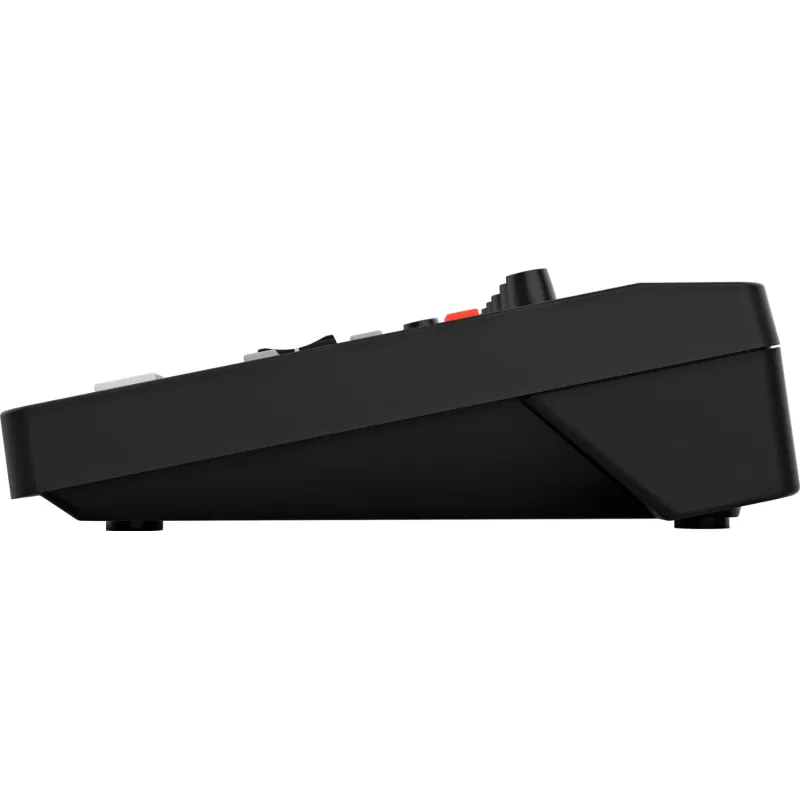
220 x 166 x 60 mm / 8-11/16 x 6-9/16 x 2-3/8 inches
Weight: 600 g / 1 lb 6 oz
Included Accessories
"Read Me First" leaflet
USB-C to Lightning cable
USB-C to USB-A cable
Roland VRC-01


 AI ASSISTANT CHAT
Or ask about:
| Type of Product | Video Mixer |
| Accessories for video cameras | iekārtas |
- 1. Evaluate your options.
- 2a. If you want to buy only one product with Aizdevums.lv leasing, then fill out the application here
- 2b. If you want to buy several items or use another leasing company, then put the items in the basket and choose the leasing service when ordering.
We offer leasing from Aizdevums SIA, Incredit SIA, ESTO.
Manager will check the availability of the items in the cart and send the loan application link. - 3. If you receive a positive response, contact us to purchase the product. Consultants will check the availability of the product.
- 4. If the product is available in the store or to be ordered from the warehouse, and you have received an affirmative answer from our consultants, please visit the store to proceed with purchase and leasing documents.
- 4a. You can also ask us to issue an invoice for this product and visit one of the leasing company branches to sign up leasing documents *..
- 5. Once the leasing documents have been signed up, you can receive the product in the store, if it is on site or inform our consultants and they will order it for you from the warehouse.
- *It is possible to arrange delivery for leased goods, so you can also perform the entire purchase process remotely.
**The sequence of leasing steps is the same for leases offered by InCredit Group.
***In case of doubt, contact our consultants!
When using leasing services, carefully evaluate your options to repay the loan!Lease
Break free from the complicated setup and tangle of cables typically needed to connect cameras, computers, and switchers for multi-camera livestreaming. With just an iPad and a few mobile phones, the revolutionary Roland AeroCaster system will have you wirelessly switching and streaming on your favorite platform in minutes.
AeroCaster makes it easy and affordable for anyone to create a wireless multi-camera setup with pro-level production quality. Leveraging the A/V power of the mobile devices that everyone carries, our breakthrough system opens up a new world of creative possibilities for any livestreaming application, from online talk shows and music performances to live commerce, remote education, and beyond.
- Powerful wireless production solution with hardware control surface/audio interface and full-featured iPad app
- Switch up to four wireless devices simultaneously, plus the camera on the host iPad
- Supports wireless camera connections from up to four supported iOS and Android smartphones and tablets
- Wirelessly share screens from computers and mobile devices via the Google Chrome web browser
- Switch between cameras, media, and scenes with a variety of transition effects
- Save and recall 30 scenes with titles, graphics, and picture-in-picture windows
- Media pool for integrating video, audio, photos, and graphics stored on your iPad
- Stream directly to YouTube, Facebook Live, Twitch, and custom RTMP channels over Wi-Fi or 4G/5G cellular networks
- Follow viewer comments in the AeroCaster LIVE app
- Record program output and independent camera feeds while livestreaming or offline
- Intuitive hardware control surface and audio interface with two XLR inputs, 3.5 mm stereo input, and headphones and monitor outputs
SYSTEM OVERVIEW
The Swiftest, Simplest Switcher Setup
AeroCaster is a super-powerful A/V switching system that’s incredibly versatile and easy to configure. In almost no time, you’ll be streaming multiple cameras and high-quality audio to YouTube, Facebook, Twitch, and custom RTMP channels over a Wi-Fi or 4G/5G cellular network.
The AeroCaster system consists of the AeroCaster LIVE app for iPad, the AeroCaster VRC-01 hardware control surface and audio interface, and the AeroCaster Camera app for iOS and Android mobile devices. BYOD screen sharing from computers and mobile devices is also supported.
AeroCaster Camera App
AeroCaster LIVE App
VRC-01 Audio Interface and Control Surface
Connect with Your Favorite Streaming Platform
AeroCaster provides an easy wireless connection to the leading streaming platforms. And your purchase of the system gives you full access to all AeroCaster features, with no subscription fee required.
Engage with Viewer Comments
When livestreaming on Facebook, YouTube, or Twitch, viewer comments are displayed within the AeroCaster LIVE app.
Capture Video from Five Sources
In addition to remote video capture from four mobile devices, you can access a fifth live video source using the camera on the iPad.
One-touch Changes with Scenes
Create up to 30 scene presets with text overlays, graphics (including transparent PNG files), adjustable picture-in-picture windows, or split-screen views.
Pro Video Effects Made Easy
Use cuts, cross-dissolves, and wipes for smooth, real-time transitions.
Access iCloud and iPad Media Content
Create titles and display video clips, photos, and graphics with data stored in iCloud or your iPad’s local media library.
The Camera You Need Is in Your Pocket
You don’t always need expensive DSLRs and camcorders for everyday video productions. With the AeroCaster system, you can take full advantage of the amazing cameras in the latest phones and use them as high-quality inputs for your livestream.
Easy Video Capture with Wireless Freedom
With all-wireless connectivity, you can use readily available stationary mounts to put the phones in places where it’s difficult to use a traditional camera. And with affordable gimbal mounts, you’re able to capture stabilized mobile shots from as far as your wireless network will reach.
Fine-Tune All Your Cameras from One Place
Once mobile devices are connected to AeroCaster LIVE, you have remote access to all their advanced camera settings from within the app. Balance and match the image between different phone cameras and control settings like focus, zoom, exposure, white balance, and more.
Record Program and ISO Video
Whether livestreaming or working offline, the flexible AeroCaster system lets you easily record productions for later editing and distribution. Capture the combined program output on the iPad and isolated video feeds on each phone. Then wirelessly transfer the phone videos to the iPad and put all the files together for post-production work in the app of your choice.
Wireless Screen Sharing with Google Chrome
AeroCaster LIVE also provides a simple solution for screen sharing from computers and mobile devices. Presenters can easily connect via the Google Chrome browser over Wi-Fi, with no cables, video adaptors, or dongles needed.
Combine Amazing Visuals with Great Sound
The AeroCaster hardware interface handles all your audio input and output needs with the power of a small broadcast mixer. Using simple and straightforward controls, one person can manage video switching and audio mixing all at once—with no prior production experience required.
Hear What Your Audience Hears
With the ability to monitor your audio mix through headphones or connected monitor speakers, you’ll know that your livestream viewers are hearing the content you’re delivering.
Stream with Top Audio Quality
The AeroCaster hardware features two combo inputs for connecting XLR microphones, electronic musical instruments, or a live sound console. And with a wide range of onboard effects, your talent will always sound their best. The headphones jack supports a feed from a headset mic or the mic on your earbuds for a third vocal source, and you can bring in additional audio from a mobile device or music player via the 3.5 mm stereo input.
Play Your Theme Music
From within the AeroCaster LIVE app, you have integrated access to media content stored on iCloud Drive. Play your opening theme to start the stream, trigger bumpers between breaks, or simply add some cool background music or sound effects whenever you like.*
Popular Applications
Music Performances
AeroCaster makes it easy for artists to connect with fans and build new ones with engaging multi-camera performance content. Grab shots from any angle and capture a high-quality stereo audio mix from the master console via the AeroCaster hardware.
Online Talk Shows
With AeroCaster, it’s never been simpler to set up and execute an online talk show or video podcast. Elevate your sound with pro broadcast mics, switch cameras among different presenters with a touch, and use the powerful onboard graphics tools to identify them with lower thirds. And with screen sharing via Google Chrome, it’s no problem to integrate charts, videos, and other content into your show as needed.
Live Selling
Entice buyers and pump up profits by presenting your products with the production quality they deserve. Mount phones to capture the perfect hero shots and demonstration views, then switch between them live with quick screen touches. Or display studio product stills, videos, and more by accessing content in your iPad’s media library.
A Growing System
AeroCaster is an evolving platform with a future roadmap for enhancing the system with new features and creative capabilities.
Connectors
MIC 1, 2 jacks: Combo (XLR, 1/4" TRS), balanced, phantom power (DC 48 V, 4 mA max)
LINE IN jack: Stereo miniature type
MONITOR OUT jack: RCA phono type
PHONES/HEADSET jack: Stereo miniature type (CTIA standard)
DC IN 5V port: USB Type-C
DEVICE port: USB Type-C
Controls
MIC 1, 2 LEVEL faders
LINE IN LEVEL fader
MAIN LEVEL fader
MIC 1, 2 COMP/LIMITER knobs
MIC 1, 2 GAIN knobs
LOOP BACK knob
HEADSET/ONBOARD MIC knob
REVERB knob
LIP SYNC DELAY knob
PHONES/HEADSET knob
MIC 1, 2 +48V switches
Indicators
POWER
DEVICE
SIG/PEAK
Audio Specs
Nominal Input Level:
MIC 1, 2: -60 to +4 dBu (Max: +24 dBu)
LINE IN: -10 dBu (Max: +10 dBu)
Input Impedance:
MIC IN: 10 kΩ (Gain < 24 dBu), 5 kΩ (Gain ≥ 24 dBu)
LINE IN: 15 kΩ
Nominal Output Level:
MONITOR OUT: -10 dBu (Max: +10 dBu)
PHONES/HEADSET: 15 mW + 15 mW (32 Ω load)
Output Impedance:
MONITOR OUT: 1 kΩ
Audio Effects
Delay
Reverb
HPF
Noise Gate
De-Esser
Compressor
Limiter
Power
USB AC adaptor (5V, ≥1.0 A recommended)
USB Bus Power
Current Draw:
AC Adaptor: 700 mA
USB Bus: 500 mA
Operating Temperature
0–40°C / 32–104°F
Dimensions and Weight
220 x 166 x 60 mm / 8-11/16 x 6-9/16 x 2-3/8 inches
Weight: 600 g / 1 lb 6 oz
Included Accessories
"Read Me First" leaflet
USB-C to Lightning cable
USB-C to USB-A cable